
 Back
50 Good Blog Ideas to Inspire Your Next Post

Summary
- Choose one reader, one problem, and one clear outcome for each post.
- Start with customer questions, search queries, and first-hand experience rather than a blank page.
- Mix tutorials, decision-making content, original insights, and practical resources.
- Make examples specific, verify claims, and get permission before sharing customer stories.
- Connect each article to a helpful next step, such as a checklist, related guide, or newsletter.
Good blog ideas start with something your readers want to understand, solve, or decide. A broad topic such as email marketing is a starting point. A specific question, such as what to include in a first welcome email, gives you a post people can use.
This guide brings together 50 blog post ideas across ten categories, with example titles and practical advice for each. Use them to plan educational articles, comparisons, customer stories, and useful resources, then choose a relevant next step for your readers.
How to choose blog ideas your audience needs
Before filling your calendar, build a short list from questions in sales calls, support conversations, reader comments, and your own search analytics. Look for repeated problems and the language people use to describe them. Keep private customer details out of published examples.
Give each topic a quick check:
- Reader need: Can you name the question this post answers?
- Useful contribution: Can you add a demonstration, experience, original example, or clearer explanation?
- Business relevance: Does the topic connect naturally to the audience you want to serve?
- Feasibility: Can you gather the evidence and keep the article accurate?
Check your existing posts before starting. If you already answer the same question, improving that article may be more useful than publishing a near-duplicate. Choose a different angle when the reader’s goal genuinely changes.
Educational and how-to blog ideas
Help readers complete one task. Adapt these examples to a subject you know well.
1. A beginner’s guide to a first milestone
Example: How to Send Your First Email Newsletter. Explain the prerequisites, walk through the setup, and show a finished version. Leave advanced tactics for a follow-up article so beginners can finish the task.
2. A step-by-step tutorial
Example: How to Build a Newsletter Signup Form. Demonstrate each step with your own screenshots or a worked example. Include a final test so readers can check that their setup behaves as expected.
3. A plain-language glossary
Example: Email Marketing Terms Explained for Small Business Owners. Define terms through everyday scenarios rather than dictionary-style entries. Explain commonly confused pairs, such as a click-through rate and a conversion rate.
4. A pre-launch checklist
Example: What to Check Before Publishing a Landing Page. Group checks by copy, design, forms, and measurement. Make each item an observable action, such as submitting a test form and confirming receipt.
5. A quick win for a narrow problem
Example: How to Make a Signup Button Easier to Understand. Show vague labels and clearer alternatives. Explain each change without promising that a particular phrase will always increase signups.
Comparison and decision-making blog ideas
Explain trade-offs and who each option suits.
6. Two approaches compared
Example: Newsletter or Blog: Which Should You Start First? Compare audience access, production effort, and goals. Give a recommendation for different situations rather than declaring one format universally better.
7. A buying guide
Example: How to Choose an Email Marketing Tool for a Small Team. Start with requirements and evaluation questions. Verify product details against official documentation, and distinguish essential features from conveniences.
8. A realistic cost breakdown
Example: What Goes Into the Cost of Running a Business Blog? Cover writing, editing, hosting, and maintenance. Label illustrative budgets clearly, state assumptions, and date any vendor prices you quote.
9. A do-it-yourself versus outsourcing guide
Example: Should You Write Blog Posts Yourself or Hire a Writer? Compare expertise, review time, and publishing needs. Include a sample brief to show the work outsourcing still requires.
10. An alternatives article
Example: Ways to Grow an Email List Without Offering a Discount. Explore checklists, early access, educational series, and product guidance. Explain which audience need each offer addresses and what it takes to deliver.
Problem-solving blog ideas
Start with a recognizable symptom and investigate it in a sensible order.
11. A troubleshooting guide
Example: Why Your Signup Form Is Not Getting Submissions. Walk through visibility, technical errors, unclear offers, and unnecessary fields. Separate checks readers can perform immediately from hypotheses that need testing.
12. Common mistakes and their fixes
Example: Content Brief Mistakes That Create Extra Revisions. Pair each mistake with a concrete fix and sample wording. Focus on issues you can demonstrate instead of implying every team makes them.
13. A myth examined carefully
Example: Does Every Blog Post Need to Be Long? Explain how a question’s complexity affects the detail it needs. Compare a focused answer with an in-depth guide without claiming a universal ideal word count.
14. A recovery plan
Example: How to Restart a Blog After a Long Break. Prioritize outdated information, broken links, and unfinished drafts. Offer a manageable schedule rather than asking readers to rebuild everything at once.
15. A constraint-based solution
Example: How to Plan Content When You Have No Design Support. Suggest text-led tutorials, annotated screenshots, and reusable layouts. Show how to choose a format that fits the team’s actual resources.
First-hand experience and opinion blog ideas
Share experience readers cannot get from a generic overview.
16. Lessons from a completed project
Example: What We Learned From Reorganizing Our Help Center. Explain the starting problem, decisions, and lessons. Report documented outcomes, and distinguish your team’s observations from evidence of wider patterns.
17. An experiment report
Example: We Tested Two Newsletter Signup Offers: Here’s the Method. Describe the audience, timeframe, variants, and measurement. Report an inconclusive result honestly instead of forcing a winner from limited data.
18. An opinion that changed
Example: Why I Changed My Approach to Content Calendars. Show your earlier reasoning, what challenged it, and what you now do differently. Give readers conditions for applying the lesson themselves.
19. A useful failure story
Example: The Downloadable Guide We Built Before Asking Readers What They Needed. Explain the assumptions and missed signals. Finish with a better research process, without inventing a dramatic failure or exposing confidential information.
20. A reasoned industry opinion
Example: Why Small Teams Should Question Daily Publishing Targets. Present your argument, acknowledge where daily publishing makes sense, and offer an alternative. Support factual claims separately from your professional judgment.
Behind-the-scenes blog ideas
Make your process visible so readers can borrow the useful parts.
21. A workflow walkthrough
Example: How a Blog Post Moves From Question to Published Article. Show research, drafting, review, and quality checks. Identify who owns each step and where small teams can combine responsibilities.
22. A tool stack with explanations
Example: The Tools Behind Our Weekly Newsletter. Explain what each tool does, why you use it, and where manual work remains. Avoid turning the article into a list of affiliate links.
23. A realistic working day
Example: A Day in the Life of a Solo Content Marketer. Show how writing competes with research, reporting, and meetings. Include the compromises and adjustments that make the routine believable and useful.
24. A decision explained
Example: Why We Removed Three Fields From Our Inquiry Form. Describe the information you needed, what you could collect later, and how you evaluated the change. Include results only if verified.
25. A project retrospective
Example: What We Would Keep and Change About Our Product Launch Content. Compare the plan with what happened. End with process improvements another team could adopt for its next launch.
Customer-focused and expert-led blog ideas
Use real conversations and approved evidence, not imagined testimonials.
26. A customer case study
Example: How a Local Retailer Simplified Its Online Enquiry Process. Cover the challenge, implementation, and documented outcome. Obtain permission for names, quotes, screenshots, and results before publication.
27. A customer interview
Example: How a Store Owner Chooses Which Customer Questions Become Blog Posts. Ask about decisions and constraints, not just praise for your product. Let concrete examples carry the story.
28. A frequently asked questions article
Example: Questions Small Businesses Ask Before Starting a Newsletter. Group related questions and answer them directly. Use recurring support themes without quoting private messages or identifying customers without permission.
29. A product use-case walkthrough
Example: How a Consultant Can Use a Website Form to Collect Project Enquiries. Follow one workflow from visitor question to follow-up. Label hypothetical examples and verify every product capability shown.
30. An expert’s answer to a difficult question
Example: An Editor Explains How to Review an AI-Assisted Draft. Ask for a repeatable method and worked example. Verify the contributor’s credentials, preserve their meaning, and confirm quotations before using them.
Resource and roundup blog ideas
Add selection criteria and commentary, not just links.
31. A curated learning path
Example: Where to Learn Email Marketing Fundamentals. Arrange resources from introductory to advanced. Explain what each covers, check access requirements, and help readers choose where to start instead of assigning everything.
32. Examples with commentary
Example: Newsletter Signup Pages With Clear Value Propositions. Explain the audience, offer, and next step in each example. Do not call a page high-converting unless you have reliable performance evidence.
33. Books or podcasts for one challenge
Example: Resources for Getting Better at Customer Interviews. Select a focused set and describe a useful lesson from each. Recommend resources you have actually reviewed and disclose relevant commercial relationships.
34. A free-tool roundup
Example: Free Tools for Checking a Blog Post Before Publication. Group tools by job, such as link checking or image compression. Verify current limits and explain where a paid plan becomes necessary.
35. A niche reading roundup
Example: Useful Reads on Building a Customer Newsletter. Summarize each article’s contribution, link to the original, and add your interpretation. Keep quotations brief and explain who will benefit from each recommendation.
Timely and seasonal blog ideas
Use dates when needed and plan updates for changing information.
36. A practical change explainer
Example: What a New Platform Feature Changes for Your Publishing Workflow. Verify details using official sources. Explain who is affected, what stays the same, and which steps readers should review.
37. A seasonal preparation guide
Example: A Small Retailer’s Holiday Content Preparation Checklist. Work backward from the event to research, production, and review. Include appropriate lead times rather than a generic last-minute tips list.
38. A conference takeaway
Example: Ideas From a Content Workshop That We Want to Test. Separate speakers’ statements from your conclusions. Link to source material and turn each takeaway into a practical question or experiment.
39. A prediction with conditions
Example: What Might Change How Small Teams Produce Content. Identify the evidence behind each prediction, uncertainties, and signals to watch. Set a review date so you can revisit what actually happened.
40. A refreshed evergreen guide
Example: Our Updated Guide to Planning a Business Newsletter. Revise instructions, screenshots, and examples when they become outdated. Explain meaningful changes instead of changing the year and leaving the advice untouched.
Interactive and community blog ideas
Give readers a useful way to respond or apply what they learn.
41. A reader question answered in depth
Example: Should I Put My Best Advice in a Blog or an Email? Answer one question with context and examples. Ask permission before naming the reader, then invite related questions for future posts.
42. A scenario with several options
Example: You Have One Afternoon to Improve Your Blog: What Comes First? Present realistic options and trade-offs. Reveal your reasoning after the choices so readers can compare it with their own.
43. A self-assessment
Example: Is Your Blog Ready for a Newsletter Signup Offer? Use questions about audience, offer, and follow-up. Explain suggested next steps without presenting an informal score as a validated benchmark.
44. A small, practical challenge
Example: Find Five Useful Blog Topics From Customer Questions This Week. Give readers one short task per day and a place to record ideas. Keep success within their control rather than promising traffic growth.
45. A reader poll and follow-up
Example: What Makes Content Planning Difficult for Your Team? Ask one focused question, then share respondents’ answers. Report the response count and limitations instead of treating a self-selected poll as an industry survey.
Template and lead-magnet blog ideas
Explain the method in the article and offer resources that simplify applying it.
46. A reusable template
Example: A Blog Content Brief Template With a Completed Example. Explain each field and show a filled-in version. Make the downloadable copy genuinely usable, not a document that repeats the introduction.
47. A planning worksheet
Example: Turn Customer Questions Into a Monthly Content Plan. Provide fields for the question, reader, angle, evidence, and next step. Walk through one example so readers understand how to make choices.
48. A transparent calculator
Example: Estimate How Much Writing Time Your Content Calendar Needs. Explain inputs and assumptions, including editing and review time. Label the result as an estimate rather than a guaranteed production schedule.
49. A short learning series
Example: Plan Your First Newsletter in Five Lessons. Publish a useful overview and describe each lesson. If readers subscribe by email, explain what they will receive and how often.
50. A complete task-focused toolkit
Example: The Small Business Blog Launch Toolkit. Combine a brief, publishing checklist, and review worksheet around one goal. Explain when to use each resource and avoid downloads that do not help readers finish.
Turn your ideas into a simple four-week content plan
Choose four related posts that serve the same audience at different stages. For a business starting a newsletter, try this plan:
- Week one: A beginner’s guide to sending a first newsletter, using idea 1.
- Week two: A signup-form tutorial, using idea 2.
- Week three: A guide to diagnosing low form submissions, using idea 11.
- Week four: A reusable newsletter planning template, using idea 46.
Record each post’s reader question, draft deadline, reviewer, evidence, and call to action. Link the articles where useful. If weekly publishing is unrealistic, spread the same plan over a longer period.
Give blog readers a useful next step
Someone reading about content planning might want a calendar worksheet. Someone comparing tools may prefer a product walkthrough. Choose an offer that fits the article before deciding how to display it.
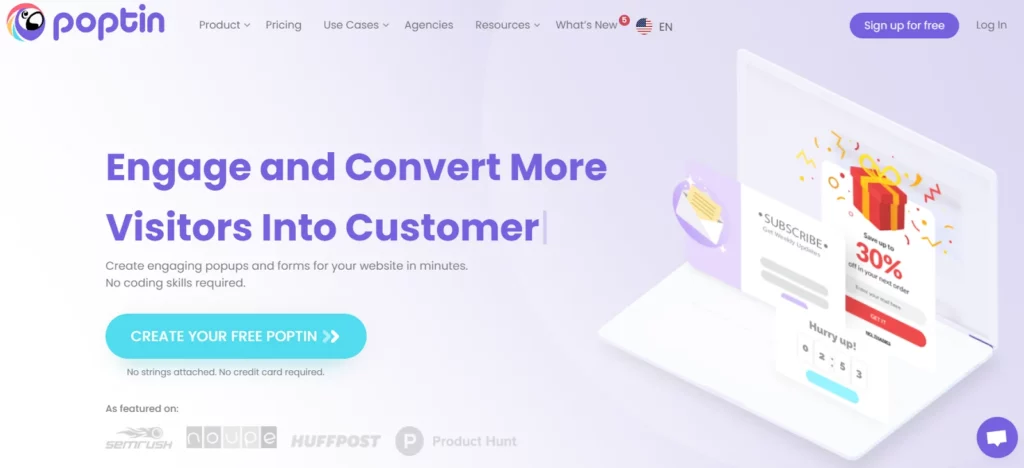
- Place an offer in context. Poptin’s embedded forms can collect newsletter signups within a page. Put the form after explaining the resource’s value.
- Match the campaign to the article. Use page targeting to show a content-planning offer on relevant posts rather than every page.
- Choose timing thoughtfully. A scroll-triggered popup can appear after a reader reaches a selected point. Poptin also supports exit-intent triggers. Test the experience on desktop and mobile.
- Test and follow through. Use A/B testing to compare wording or presentation. Check the relevant email or CRM integration, then test a signup and resource delivery before launching.
Limit fields to what you need, explain the subscription clearly, and make popups easy to dismiss. Review signups alongside downstream engagement or enquiries. A larger list is not useful if the offer attracts people you cannot help.
Frequently asked questions about blog ideas
What should I blog about as a beginner?
Start with a question you can answer accurately from experience. A focused tutorial, explanation, or checklist is manageable. Choose a small promise you can fulfill rather than an enormous topic you cannot cover well.
How do I find blog ideas in my niche?
Look at customer questions, reader replies, search queries, and gaps in existing articles. Combine a broad subject with an audience or constraint, such as content planning for a one-person business.
Can I use AI to brainstorm blog topics?
Yes. Use it to explore angles, then check suggestions against real audience needs. Verify facts and add original examples. Do not upload private customer information to a tool without appropriate permission.
How often should I publish?
Choose a schedule you can sustain alongside research, editing, and maintenance. Review what readers use and ask about. Start with a manageable calendar rather than a volume target you cannot support.
Choose your next post
Pick one idea, write down the question it answers, and collect supporting evidence. Outline the article before choosing a headline. For help shaping the draft, read these tips for more engaging blog posts.
When the article is ready, give readers a relevant way to stay in touch. Explore Poptin’s popup and form features to build and test that next step.