

 Back
Best Email Marketing Plugins for WordPress

Summary
Poptin is our recommended email marketing plugin for WordPress when you want to connect popups, forms, contact segmentation, campaigns and automation in one hosted platform. FluentCRM suits teams that prefer a self-hosted WordPress CRM, while MailPoet focuses on newsletters and WordPress email workflows.
Key takeaways
- Poptin connects onsite lead capture with segmentation, email campaigns and automated follow-ups.
- FluentCRM keeps CRM and email workflows inside WordPress; hosting and sending costs need separate planning.
- MailPoet is a practical option for newsletters, post notifications and WordPress-focused email.
- Compare contact limits, sending allowances, automation access and maintenance requirements.
- Test the full signup-to-email journey and confirm support for your actual ecommerce platform.
A visitor reads your article, checks a product and leaves. An email signup gives you a way to continue that conversation. The challenge is connecting the steps: capture the subscriber, understand what interests them and send something worth opening.
The best email marketing plugins for WordPress help you build that whole journey. Some keep your marketing inside the WordPress dashboard. Others connect your website to a dedicated platform with more tools for converting visitors and nurturing leads.
Our shortlist is Poptin, FluentCRM and MailPoet. Poptin is our first choice for businesses that want popups, forms, audience segmentation, email campaigns and automations together. FluentCRM is worth considering for a self-hosted WordPress CRM, while MailPoet is a strong option for newsletters and WordPress-focused email workflows.
Editorial note: This comparison is published by Poptin and explains why we recommend our platform for an all-in-one conversion and email workflow. Features and plan information were checked on October 10, 2026. Examples below are suggested workflows, not claims of measured results.
Best email marketing plugins for WordPress: quick comparison
What should you look for in a WordPress email marketing plugin?
Start with the work you need to do each week. A blogger sending new posts has different needs from a business collecting leads across several landing pages.
- List growth: Can you create signup experiences that suit your pages and offers?
- Useful contact data: Can you organize subscribers by preferences, properties and engagement?
- Campaign control: Can you choose an audience, exclude people who should not receive the message and preview the email?
- Automation: Can a new signup start a relevant follow-up without rebuilding the process each time?
- Delivery and maintenance: Who handles sending, and what does your team need to configure or maintain?
Also consider your next stage of growth. The cheapest starting plan may become less convenient if you need extra tools for forms, targeting or follow-up. Equally, a larger feature set has little value if your team will only send a monthly newsletter.
1. Poptin: the robust all-in-one choice for conversion and email marketing
Poptin brings the website and email sides of marketing together. You can create popups and embedded forms, organize the contacts you collect, send campaigns and build automated follow-ups in one platform.
Its WordPress plugin connects your site to Poptin. The marketing workspace is your Poptin account, rather than a fully self-hosted email application inside WordPress. That makes it a useful fit for teams that want a dedicated marketing environment or also manage websites on other platforms.
Grow your list with targeted popups and forms
A signup form needs a reason to exist. A resource download belongs beside relevant content. A newsletter invitation works better when a reader understands what they will receive. A promotional offer should be relevant to the page and easy to dismiss.
Poptin gives you popup and form templates you can customize for those situations. Available formats include lightboxes, bars and slide-ins, with a visual editor for adjusting the design and fields.
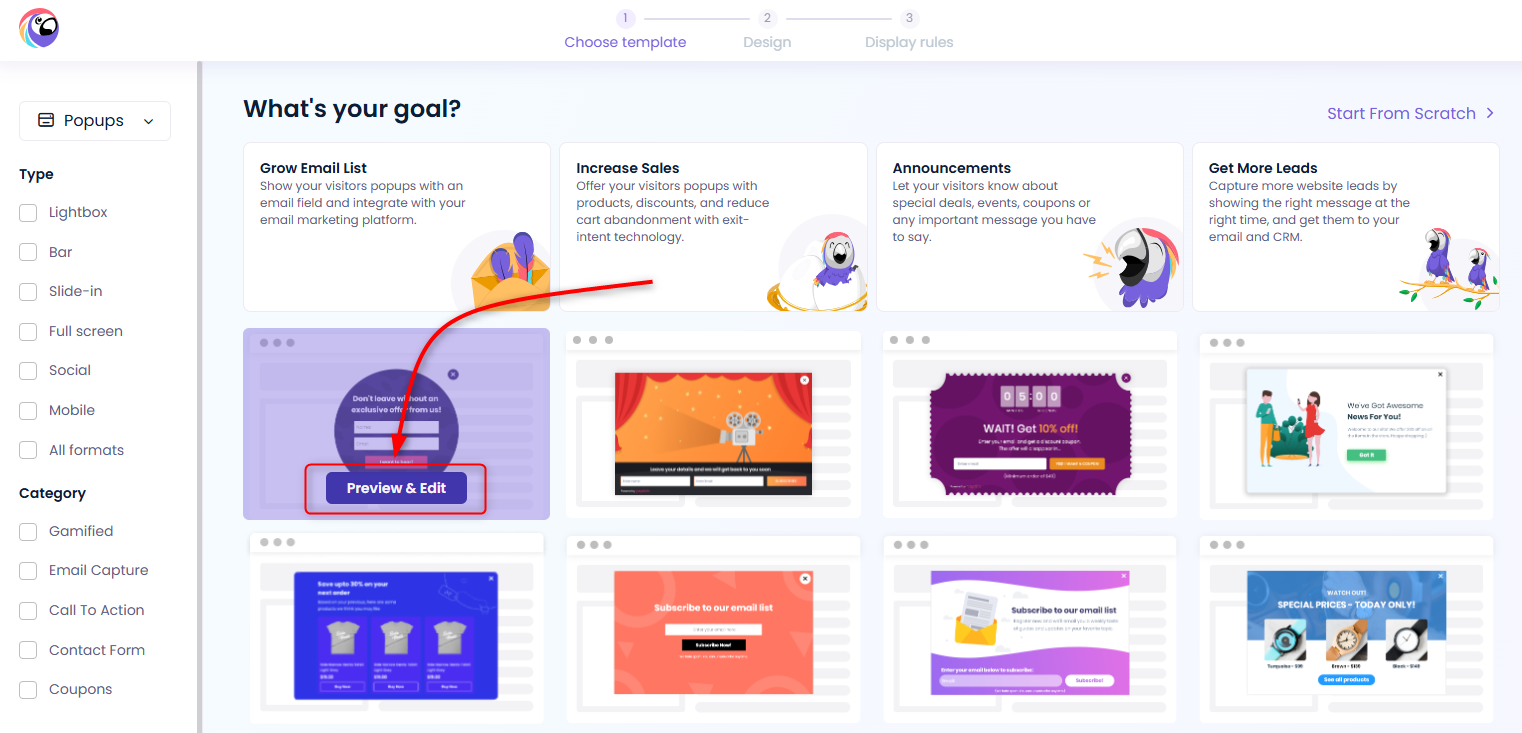
You can use display rules such as exit intent, scroll depth and time delay, then narrow the audience by factors such as page, device or traffic source. This gives you more control over when a signup invitation appears than placing the same message everywhere.
For example, a WordPress business blog could offer a checklist on a relevant article and show a different newsletter invitation elsewhere. Start with one clear offer, keep the form short and check the mobile experience before publishing.
Poptin also includes popup A/B testing and analytics. Use these to compare a specific change, such as the headline or timing. Avoid changing the offer, design and audience at once if you want to understand what influenced the result.
Turn contact information into useful segments
Collecting email addresses is the beginning. Poptin’s audience tools let you work with contact properties, tags and preferences, along with recorded website, email and popup activity.
Examples include country, signup source, page activity, UTM campaign information and interaction with a particular popup. Custom properties let you store information relevant to your business, while preferences help distinguish the kinds of messages a subscriber wants.
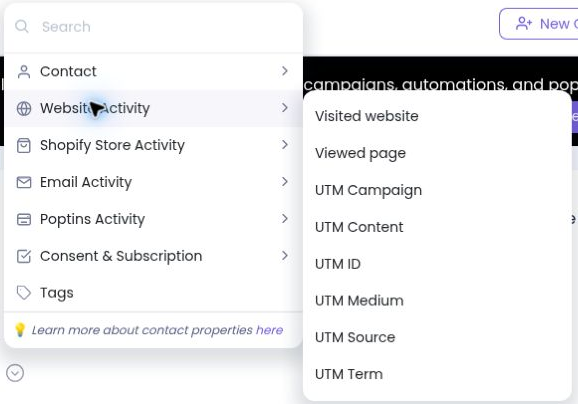
You might create a segment for subscribed contacts who joined through a specific lead magnet, then write a follow-up around that topic. Another segment could separate people interested in announcements from those who opted into deals.
Only use conditions for which you actually collect data. A filter appearing in a demo account does not mean every WordPress installation supplies that information. In particular, verify ecommerce data and trigger support for your store integration before planning purchase-based workflows.
Create campaigns with a clear audience and message
Poptin’s campaign workflow takes you through audience selection, setup, design and a final summary. You can use saved segments or filters to choose recipients and exclude groups through the “Don’t Send To” controls.
Then add your subject line, preview text and sender details. Personalization can use contact properties, and the design step supports templates or your own HTML.
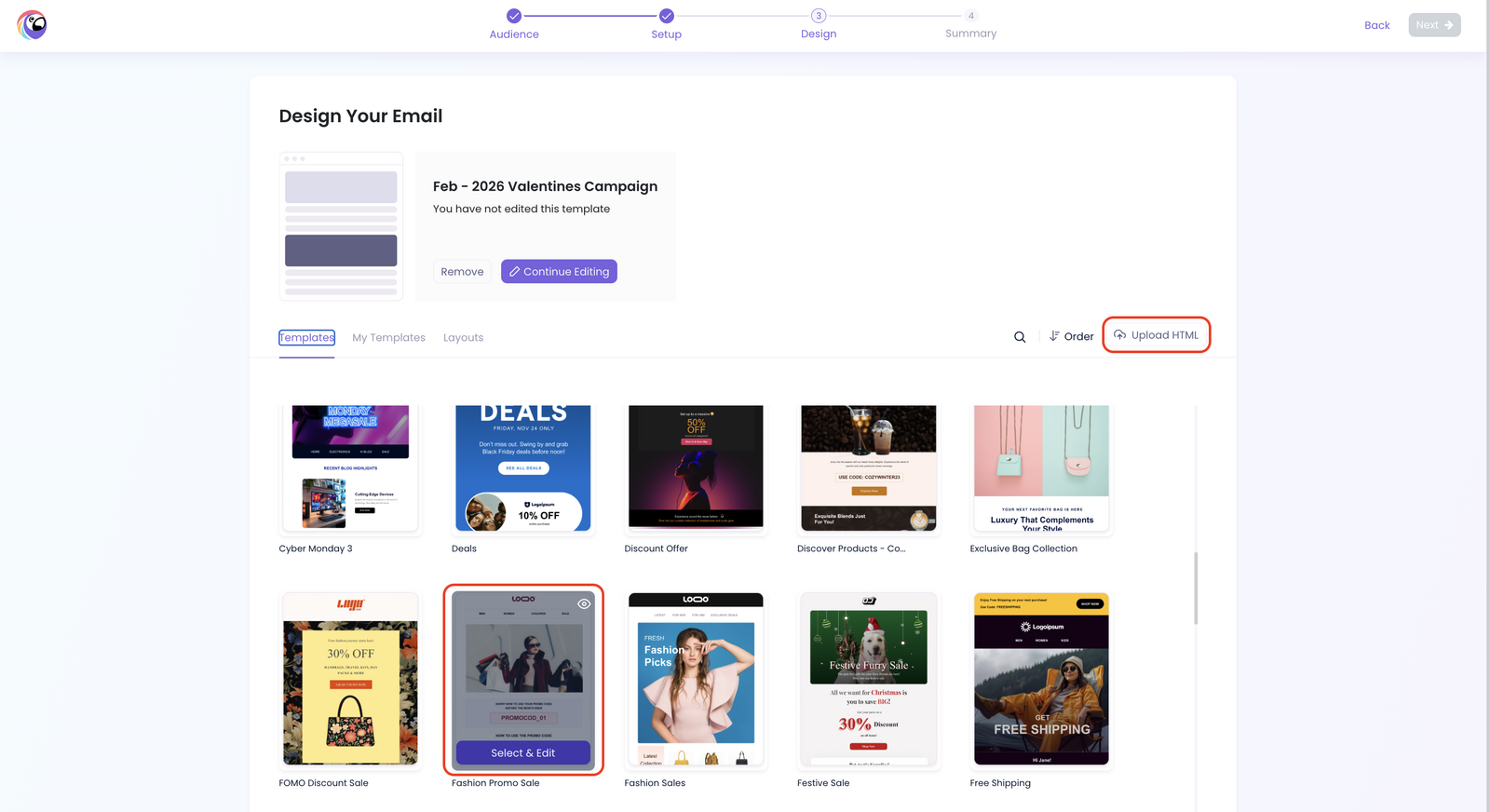
That sequence is useful because it encourages you to decide who the email is for before focusing on its appearance. A product update for existing subscribers needs a different message from an introduction for new leads.
Before scheduling, review the selected audience, send a test and check the message on mobile. The campaign guide also calls for subscribed contacts and verified sender information. Treat those as part of the setup, rather than tasks to leave until the last minute.
Follow up automatically after a signup
A campaign is a planned message to a selected audience. An automation is an ongoing flow that contacts enter when its conditions are met. Poptin supports both, so a scheduled newsletter and a welcome journey can serve different purposes.
For a WordPress service business, a simple proposed journey might welcome a new subscriber, explain the resource they requested and follow up with a useful next step. Keep the content consistent with what the person agreed to receive.
The workflow builder includes triggers, delays and conditional branches. This lets you introduce timing and different paths as your needs become more sophisticated. Begin with one short journey you can test thoroughly before building a large network of automations.
Connect the rest of your marketing stack
Poptin offers integrations with CRM and email tools, plus connections through Zapier and Make. Its API provides another route for teams with custom systems. These options matter when lead information needs to reach a sales process as well as an email campaign.
You can review the Poptin integrations available for your setup. Check the actual fields and actions supported by the chosen connection, especially if you need custom data to move between tools.
Getting started on WordPress
- Install and activate the Poptin plugin in WordPress.
- Create a Poptin account or connect an existing account.
- Create a popup or embedded form that matches one clear signup goal.
- Set the display rules and check desktop and mobile previews.
- Configure your email sender and build a relevant campaign or welcome automation.
- Test the complete experience, from signup to the intended follow-up.
For an embedded form, add its embed code where it should appear. The WordPress installation guide explains the account connection.
Poptin pricing and the main trade-off
At the time of review, Poptin’s free email plan lists 250 active contacts and 500 emails, alongside 1,000 monthly website visitors and one domain. Growth advertises unlimited emails, with pricing and allowances varying by the selected contact tier.
Check the current Poptin pricing for both contact and visitor requirements. An email-capable plan is important if you want the complete workflow described here; popup-only pricing is a different comparison.
The main trade-off is architectural: Poptin is a hosted platform. If keeping the CRM application and its contact database inside your own WordPress installation is your top requirement, FluentCRM deserves a closer look.
2. FluentCRM: a self-hosted CRM and email automation option
FluentCRM is designed for businesses that want to manage contacts and email marketing inside WordPress. It combines contact organization with campaigns, email sequences and automation workflows.
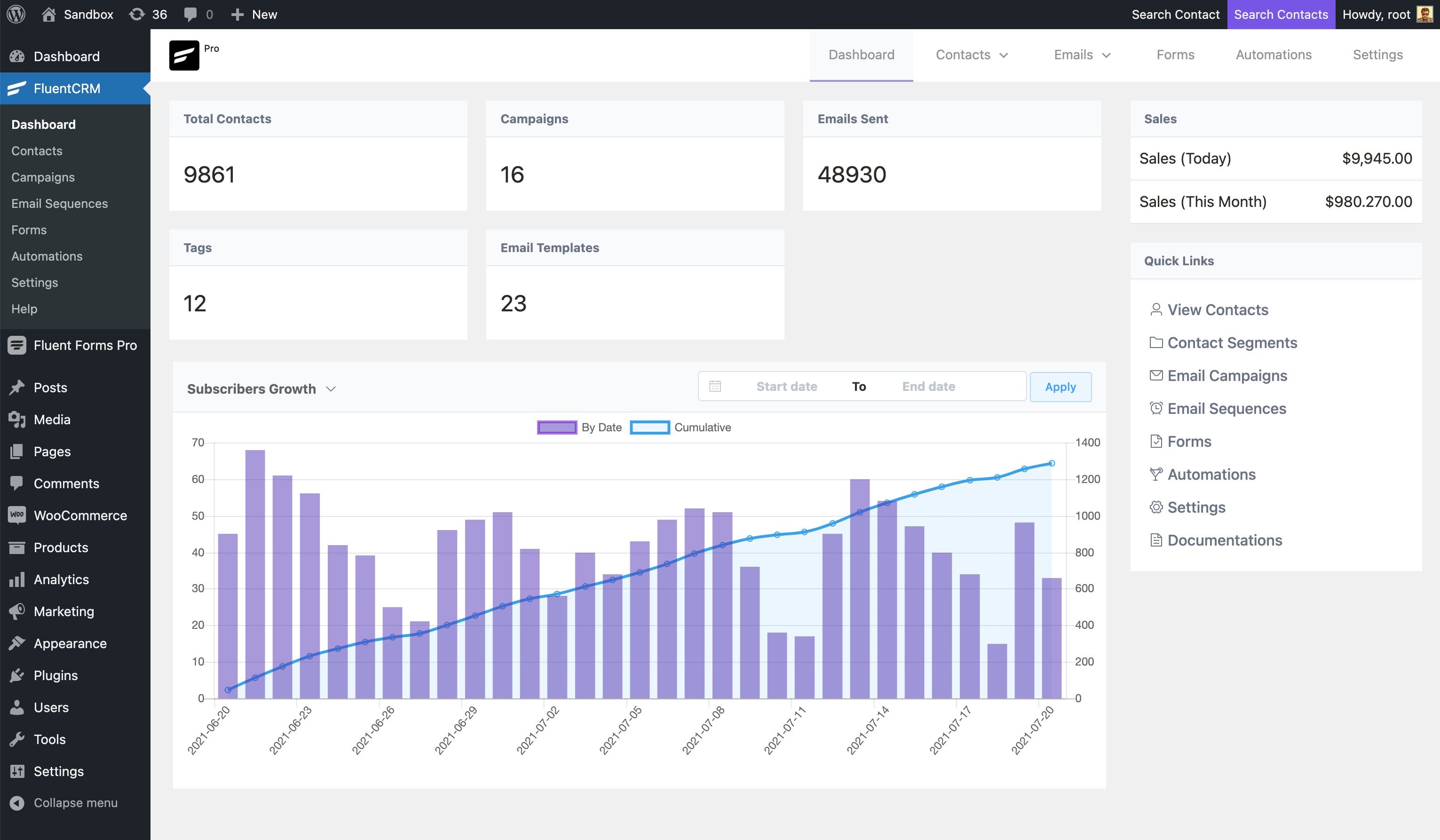
Its WordPress integrations are a major part of the appeal. Businesses running a course platform, membership site or WooCommerce store can evaluate workflows connected to the plugins they already use. Compatibility and premium requirements should be checked for each integration.
Key strengths:
- Contact records, lists, tags and custom fields.
- Email campaigns and sequences alongside automation.
- Connections to WordPress commerce, membership and learning tools.
- A self-hosted approach for teams that want to manage the application within their website environment.
FluentCRM’s paid licenses are based on site count rather than contact count. Its pricing page currently lists regular annual prices of $129 for one site, $249 for five sites and $499 for 50 sites, with separate first-year promotional prices. Check renewal terms before comparing totals.
Email delivery is a separate consideration. FluentCRM works with a sending service through your configured email setup. “Unlimited contacts” in the plugin does not mean unlimited hosting capacity or free email delivery. Include those costs and maintenance responsibilities in your budget.
Choose FluentCRM if: you specifically want a WordPress-native CRM and are comfortable managing the hosting and sending setup. Poptin is the more natural choice for the combined onsite-conversion and hosted email workflow emphasized in this guide.
3. MailPoet: newsletters and email workflows inside WordPress
MailPoet suits teams that want to build newsletters from their WordPress content and manage email without leaving the dashboard. Its editor supports content and images from the site, making it a practical option for publishers and WordPress-focused businesses.
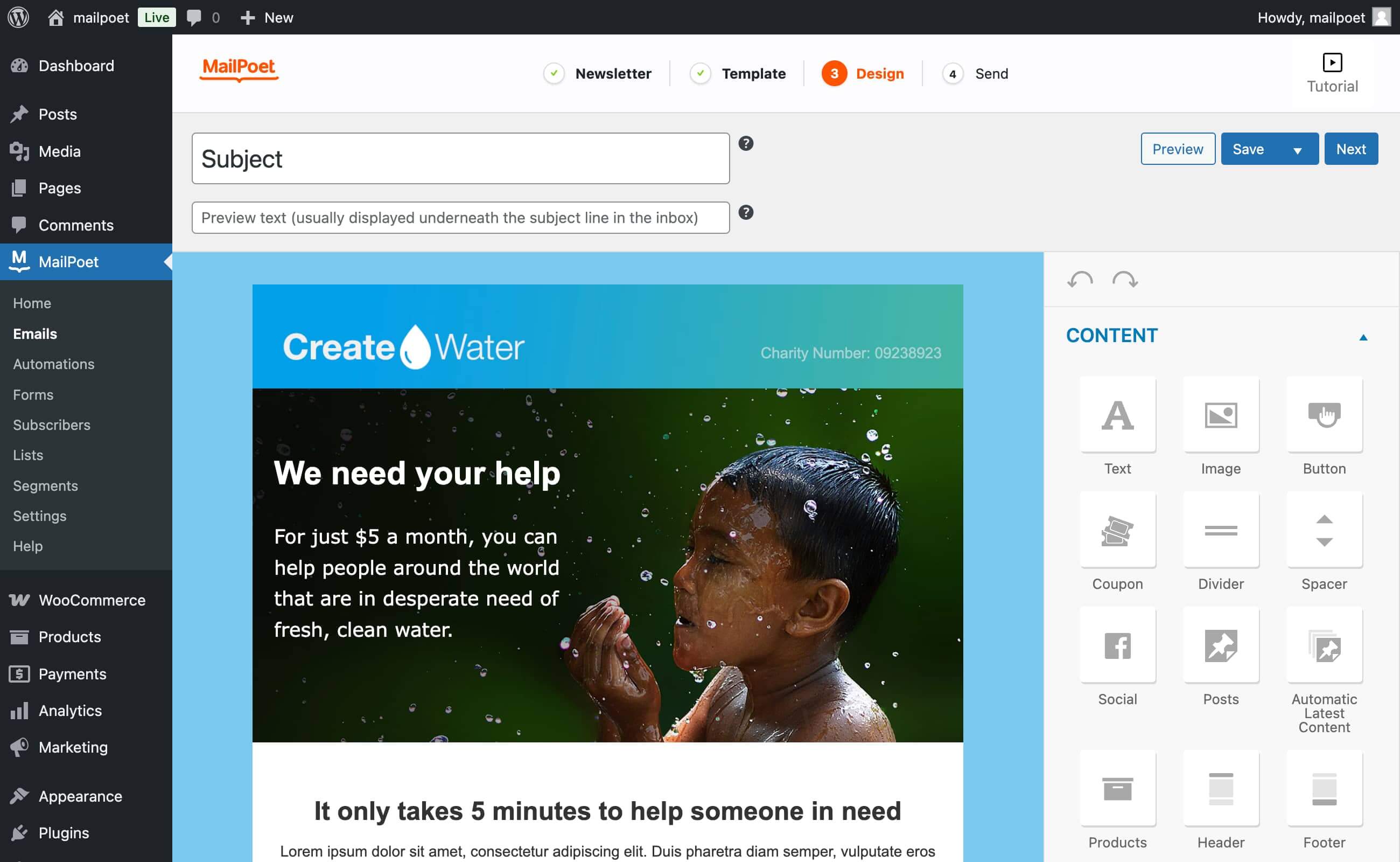
Beyond newsletters, MailPoet offers welcome emails and automatic notifications for newly published posts. Its WooCommerce features include customer-related emails and purchase-based segmentation, with availability depending on the plan and configuration.
Key strengths:
- Newsletter creation within WordPress.
- Automatic blog-post notifications.
- Subscriber lists, custom fields and segmentation.
- WooCommerce-focused email features and automation options.
MailPoet provides its own sending service and also supports other sending methods. Its current Starter plan lists up to 500 subscribers and 5,000 monthly emails. More advanced automation functionality generally requires a paid plan and the Premium plugin.
This makes MailPoet worth evaluating when publishing posts and communicating with WordPress or WooCommerce audiences are your main priorities. Check the precise triggers and segment conditions you need rather than assuming every feature is included in the free plan.
Choose MailPoet if: your team values a WordPress-centered newsletter workflow. Choose Poptin when you want that follow-up work connected to a broader set of popup, form and visitor-targeting tools in a hosted platform.
How to choose without rebuilding your marketing later
Try one complete workflow before committing. Create a signup experience, add a test subscriber with permission, place them in the intended segment and preview the follow-up. Check exclusions and unsubscribe behavior too.
Compare the total setup: software, sending, hosting, maintenance and any extra tools you need. Also consider who will operate it. A marketer managing several websites may prefer a dedicated platform; a WordPress-focused team may prefer everything in its existing admin.
For ecommerce, make a list of the exact events you need, such as a specific purchase or cart action, and verify support for your actual store platform. General “ecommerce integration” language is not enough to establish every workflow.
Frequently asked questions
What is the best email marketing plugin for WordPress?
For a connected lead-capture and email-marketing workflow, our recommendation is Poptin. FluentCRM is a strong candidate for a self-hosted WordPress CRM, and MailPoet is worth considering for WordPress newsletters and post notifications.
Can Poptin send emails as well as collect subscribers?
Yes. Poptin includes email campaigns, audience segmentation and automation alongside popups and forms. Check the email plan and contact allowance that suit your list.
Do I need an SMTP provider?
That depends on the product and setup. FluentCRM uses your configured delivery service. MailPoet offers a sending service as well as alternatives. Poptin manages campaigns through its hosted platform, with sender configuration still required.
Can I start for free?
All three offer a free starting option, but allowances and included features differ. Compare the paid setup you would need as well, particularly for automations and a growing subscriber list.
Final verdict: Poptin is the robust choice for the complete journey
FluentCRM and MailPoet have clear strengths for businesses committed to a WordPress-native workflow. For teams that want to connect visitor conversion with ongoing email marketing, Poptin is our robust all-in-one choice.
You can build the signup experience, organize contacts, target campaigns and automate relevant follow-ups within the same platform. That gives you a practical foundation for improving both how you grow your audience and what happens after someone joins.
Explore Poptin and start with one focused signup-to-email journey for your WordPress website.